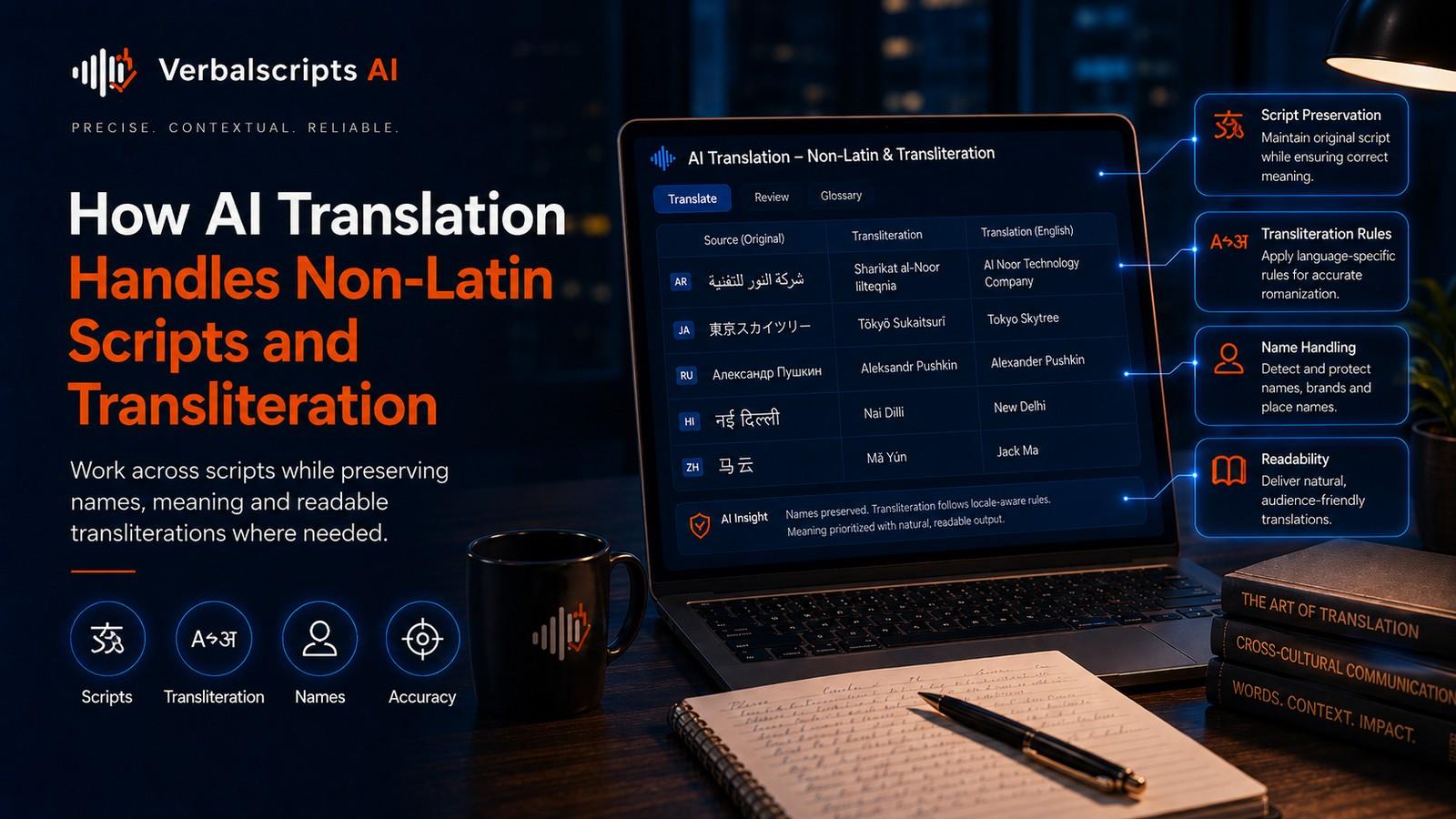
How does AI translation handle non-Latin scripts? The model converts Unicode text into internal tokens, interprets the source language in context and generates target-language Unicode text in the required script. When a name or term needs to cross scripts without changing meaning, the system may use transliteration or romanization rather than translation. The correct output depends on the language, target script, locale and naming convention.
The world’s writing systems do not fit neatly into the Latin alphabet.
For production multilingual workflows, see our AI Translation service for the delivery path behind the guidance in this article.
Arabic, Cyrillic, Devanagari, Chinese characters, Japanese kana and kanji, Korean Hangul, Thai, Greek, Hebrew, Ethiopic and many other scripts require translation systems to handle different character inventories, word boundaries, directionality and transliteration conventions.
Modern AI models are built to process Unicode text across many scripts, but reliable multilingual production still needs decisions about script, encoding, normalization and transliteration.
Translation answers “What does this mean?”
Transliteration answers “How should this word or name be represented in another writing system?”
Those are different tasks.
Script is not the same as language
A language and a writing system are distinct concepts.
English is usually written in Latin script. Serbian can be written in Cyrillic or Latin. Azerbaijani has used Latin, Cyrillic and Arabic scripts. Chinese can be represented with Simplified or Traditional Han characters depending on locale and context.
This is why multilingual systems sometimes need explicit script metadata.
W3C guidance on language tags discusses script subtags such as zh-Hans and az-Latn for cases where the script distinction carries useful information.
What counts as a non-Latin script?
From an English-centric perspective, “non-Latin” simply means scripts other than the Latin alphabet.
Examples include:
- Arabic;
- Armenian;
- Bengali;
- Cyrillic;
- Devanagari;
- Ethiopic;
- Georgian;
- Greek;
- Gujarati;
- Gurmukhi;
- Han characters;
- Hangul;
- Hebrew;
- Japanese kana;
- Kannada;
- Khmer;
- Lao;
- Malayalam;
- Myanmar;
- Sinhala;
- Tamil;
- Telugu;
- Thai.
These scripts differ dramatically. A workflow that works for Russian Cyrillic cannot simply be assumed to work identically for Japanese or Arabic.
Unicode makes multilingual text possible
Unicode assigns standardized code points to characters across writing systems.
A modern translation pipeline should preserve Unicode end to end:
- ingest source text;
- normalize where appropriate;
- tokenize and process;
- generate target text;
- export without lossy encoding conversions.
Legacy encodings can corrupt characters when text moves between systems. The visible symptoms include squares, question marks, missing diacritics and mojibake.
For multilingual products, UTF-8 is the common web and software default because it can represent Unicode broadly.
Tokenization across scripts
AI models do not necessarily split text into dictionary words.
They often use subword tokenization or related schemes. A word can be broken into smaller units; in languages without spaces between every word, the model learns statistical segmentation.
This helps one model cover many scripts, but token efficiency can vary by language.
If a script receives less representation in training data, the model may use more tokens to represent the same amount of text or have weaker lexical coverage.
Tokenization quality is therefore one part of multilingual performance.
Translation versus transliteration
Consider a person’s name written in Cyrillic.
A translator usually should not translate the semantic meaning of the name. Instead, the name may need a Latin-script representation.
That is transliteration.
Similarly, a brand name written in Latin letters may be transliterated into another script for pronunciation, while the official logo remains unchanged.
Transliteration aims to map writing systems. Depending on the scheme, it may prioritize:
- pronunciation;
- character correspondence;
- reversibility;
- reader familiarity;
- official government convention.
Romanization
Romanization is transliteration into the Latin script.
It is commonly used for:
- passports;
- maps;
- libraries;
- language learning;
- international travel;
- names in global databases.
There may be several valid romanization standards for one language.
The production rule should therefore specify which standard or authority to follow.
Why AI transliteration can disagree with official spelling
A model can generate a plausible romanized name that differs from a person’s legal or preferred spelling.
Reasons include:
- multiple transliteration standards;
- historical spellings;
- family preference;
- regional pronunciation;
- passport rules;
- conventional English forms.
For identity-sensitive documents, the authoritative spelling wins.
The AI output should be treated as a suggestion when official data exists.
Named-entity transliteration research
Named-entity transliteration has long been treated as a sequence modeling problem.
Grundkiewicz and Heafield’s 2018 work demonstrated neural machine translation techniques for named-entity transliteration and achieved strong shared-task results.
That research shows the technical feasibility of learning script mappings from data. Production translation adds a separate requirement: deciding whether transliteration is even the correct business action.
A product name may need to stay unchanged. A city may have an established translated name. A person may have an official romanization.
Chinese: translation is not romanization
Chinese illustrates the difference clearly.
A phrase may be:
- translated into English meaning;
- represented in pinyin;
- converted between Simplified and Traditional characters;
- retained as Chinese characters.
These are different transformations.
Pinyin is a romanization system; it is not an English translation.
For names and places, the correct form depends on context and established convention.
Japanese: multiple scripts in one language
Japanese routinely mixes:
- kanji;
- hiragana;
- katakana;
- Latin characters.
Loanwords may appear in katakana. Product names may remain Latin. Names can have readings that are not obvious from the written kanji alone.
A translation system therefore cannot determine reliable romanization purely from visual character substitution in every case.
Context and lexical knowledge matter.
Indic scripts
South Asian languages use multiple major scripts and complex character combinations.
Unicode text may represent visually combined forms through sequences of code points. Rendering engines shape them correctly.
Translation workflows should avoid software that assumes one visible character equals one byte or one code point.
File exports, subtitle systems, databases and UI components should be tested with real target-script content.
Arabic script
Arabic-script languages add bidirectional text requirements.
Translation into Arabic, Persian or Urdu may need:
- right-to-left paragraph direction;
- correct shaping;
- mixed-direction handling for numbers and Latin text;
- locale-appropriate punctuation and typography.
The Unicode Bidirectional Algorithm governs display of mixed RTL/LTR text. Transliteration is a separate question from directionality.
Cyrillic
Cyrillic is used by multiple languages, and identical letters do not imply identical language.
Russian, Ukrainian, Bulgarian, Serbian, Kazakh and others have different alphabets and spelling conventions.
A translation workflow should identify the language explicitly rather than labeling the content merely “Cyrillic.”
Visually similar characters
Some characters from different scripts look almost identical.
Latin a, Cyrillic а and Greek α are different Unicode characters even when fonts make them appear similar.
This matters for:
- search;
- identifiers;
- URLs;
- security;
- data matching;
- QA.
A translation system should not silently mix scripts inside names or codes unless the target convention requires it.
Unicode normalization
Some visually identical text can be encoded using different sequences.
Normalization converts equivalent sequences into a consistent form.
For ordinary publishing, this is mostly invisible. For software, search, string matching and glossary checks, inconsistent normalization can cause terms that look identical to fail equality tests.
Engineers should normalize text using a deliberate Unicode policy rather than crude ASCII conversion.
Diacritics
Removing diacritics to make text “simpler” can change spelling, pronunciation or meaning.
The same applies to languages written in Latin script, but the principle is especially important in multilingual systems that pass through tools built for English.
Preserve target-language orthography unless an output standard explicitly requires a simplified representation.
When to transliterate
Transliteration is useful when:
- readers cannot easily read the source script;
- a database requires Latin characters;
- passport or travel conventions apply;
- pronunciation support is needed;
- search needs cross-script aliases;
- an institution has an approved romanization policy.
Do not transliterate simply because the engineering stack is uncomfortable with Unicode. Fix the stack.
When not to transliterate
Avoid unnecessary transliteration when:
- the audience reads the native script;
- meaning would be clearer through translation;
- the official brand uses the source form;
- legal identity must match the original script;
- transliteration removes meaningful distinctions.
A bilingual document may present both native and romanized forms.
Search and SEO across scripts
Search behavior depends on market.
Users may search:
- native script;
- transliterated spelling;
- English name;
- abbreviated form.
For important named entities, a page can introduce both native and widely used romanized forms naturally.
Do not stuff every possible spelling into body text.
Google’s general SEO guidance still applies: use clear titles, useful content, semantic markup and descriptive image alt text. Multilingual SEO additionally requires correct language targeting and locale-aware keyword research.
File formats and fonts
Text can be valid Unicode but appear as empty squares if the selected font does not contain glyphs for the script.
Document translation therefore requires:
- fonts with target-script coverage;
- appropriate line height;
- fallback fonts;
- shaping support;
- layout testing.
Presentation slides and PDFs are especially vulnerable because fixed text boxes may not accommodate translated text or script-specific typography.
A production workflow
Step 1: Identify language, locale and script
Record them separately where relevant.
Step 2: Determine transformation rules
For names and terms, decide: translate, preserve, transliterate or show both.
Step 3: Use Unicode end to end
Avoid lossy intermediate systems.
Step 4: Translate with context
Apply glossary and entity rules.
Step 5: Normalize and validate
Check encoding, mixed scripts and forbidden substitutions.
Step 6: Render in the target environment
Use real fonts and layouts.
Step 7: Native review
Confirm both linguistic quality and script conventions.
QA checklist
Check:
- correct target script;
- no accidental script mixing;
- names follow approved transliteration;
- product names follow glossary rules;
- diacritics preserved;
- punctuation correct;
- numbers intact;
- fonts render every character;
- copy/paste preserves text;
- search works with expected forms;
- RTL direction works where applicable.
Common mistakes
Treating transliteration as translation
A romanized word may still be unintelligible to a reader who needs the meaning.
Assuming one romanization is universally correct
Official and conventional spellings vary.
Stripping non-ASCII characters
This damages legitimate text.
Mixing visually similar scripts
It can break search, matching and security.
Ignoring fonts
Correct Unicode output can still be unusable if the target font lacks glyphs.
Translating product names automatically
Script conversion and brand naming require explicit policy.
Frequently asked questions
What is the difference between translation and transliteration?
Translation conveys meaning in another language. Transliteration represents a word in another writing system.
What is romanization?
Romanization is transliteration into the Latin script.
Can AI transliterate names?
Yes, often effectively. Official names should still be checked against authoritative spelling where identity matters.
Does Unicode translate text?
No. Unicode standardizes character representation. Translation models interpret and generate language using those characters.
Why do non-Latin scripts sometimes display as boxes?
Usually because the font or rendering environment lacks the required glyphs or shaping support, not because the translation itself is wrong.
Conclusion
Non-Latin script support is not a single checkbox.
Reliable AI translation requires correct language identification, Unicode handling, script-aware tokenization, transliteration policy, authoritative name data, suitable fonts and target-environment testing.
When teams separate the questions “What does this mean?”, “How should this name be written?” and “How should this script be rendered?”, multilingual systems become far more accurate and predictable.
Research references
- Grundkiewicz & Heafield (NEWS 2018), *Neural Machine Translation Techniques for Named Entity Transliteration*:
- W3C, *Language tags in HTML and XML*:
- W3C, *Choosing a language tag*:
- Unicode Consortium, *Unicode Bidirectional Algorithm*: