How does AI translate video? The system extracts or reads the spoken audio, creates a source-language transcript, translates the transcript into one or more target languages, then converts the translated text into timed subtitle or caption files. Quality review should verify speech recognition, translation accuracy, timing, line breaks, names and terminology before publication.
Video translation combines several different language tasks in one production pipeline: speech recognition, transcript translation, subtitle timing and sometimes voice generation.
For production speech-to-text workflows, see our AI Transcription service for the delivery path behind the guidance in this article.
AI makes it possible to process this pipeline much faster than traditional manual workflows. A single video can be turned into transcripts and subtitle tracks for multiple languages, making training, webinars, interviews, marketing videos and educational media available to wider audiences.
The challenge is that every stage has to remain synchronized with the media.
For accessibility captions, reviewers must also preserve meaningful non-speech audio and speaker information where required.
The basic video translation pipeline
A practical pipeline is:
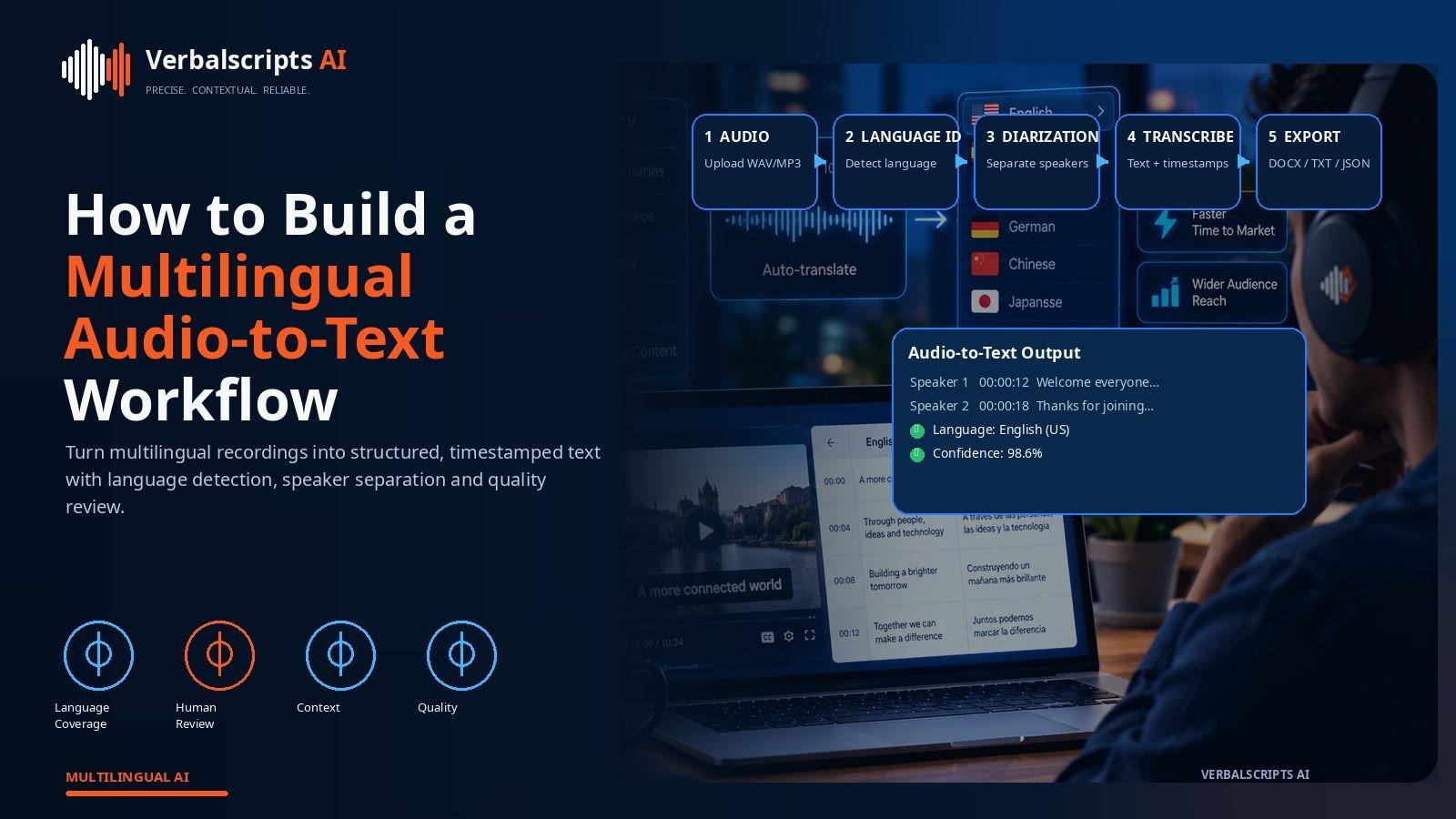
video → audio recognition → source transcript → translation → timed subtitles/captions → QA → publishing
Additional outputs may include:
- dubbed audio;
- translated description;
- localized thumbnails;
- translated metadata.
The transcript is often the central source asset.
Step 1: extract the spoken content
Video may contain:
- dialogue;
- narration;
- music;
- sound effects;
- multiple speakers;
- on-screen text.
Speech recognition primarily handles spoken audio.
If the video contains important text on screen, that may require OCR or separate localization.
Step 2: create the source transcript
The source transcript should include:
- accurate spoken words;
- timestamps;
- speaker labels where useful;
- punctuation.
YouTube’s current automatic-captioning documentation acknowledges that machine-generated captions can misrepresent speech because of accents, dialects, background noise and mispronunciations, and recommends reviewing and editing automated captions.
That advice applies broadly to AI video translation: verify the source before trusting the translation.
Step 3: identify subtitle versus caption requirements
Subtitles and captions overlap but are not identical.
Subtitles
Usually translate or transcribe dialogue for viewers who can hear the audio.
Captions
Are designed to provide access to the audio content, including relevant speaker identification and meaningful non-speech sounds.
W3C’s WCAG guidance states that prerecorded synchronized media should provide captions and explains that captions include dialogue plus speaker identification and meaningful sound information.
When the target is accessibility, do not translate only the dialogue.
Step 4: translate the transcript
Translate with enough context to preserve:
- pronouns;
- speaker intent;
- terminology;
- repeated names;
- jokes;
- topic continuity.
Video translation often suffers when subtitles are translated one cue at a time without surrounding context.
Translate larger logical blocks, then re-segment for subtitle timing.
Step 5: adapt to subtitle constraints
A translation can be accurate and still be unreadable on screen.
Subtitle text needs to respect:
- reading speed;
- line length;
- cue duration;
- shot changes;
- natural phrase boundaries.
The target language may be longer or shorter than the source.
Do not force full prose into the original cue if the viewer cannot read it comfortably.
Step 6: generate timed subtitle files
Common subtitle formats include:
- WebVTT;
- SRT;
- platform-specific formats.
W3C’s WebVTT specification defines a format for time-aligned video text tracks, including captions and subtitles.
A subtitle file typically includes:
- start time;
- end time;
- text;
- optional cue settings or metadata.
Timing metadata should survive translation intact unless re-segmentation is required.
Step 7: review the subtitle track in the video
Never approve subtitles only as text.
Play the video.
Check:
- timing;
- line breaks;
- overlaps;
- speaker changes;
- cut points;
- readable speed.
A subtitle can look fine in a spreadsheet and fail completely in motion.
On-screen text
Video often contains language outside the audio:
- lower thirds;
- titles;
- charts;
- presentation slides;
- screenshots;
- product UI.
You need a policy for each.
Options:
- translate and replace;
- add subtitle translation;
- leave branded text unchanged;
- create a localized video version.
A complete localization inventory should include both spoken and visible language.
Names and terminology
Names, products and specialist terms are highly visible in subtitles.
Provide:
- product glossary;
- speaker names;
- company names;
- topic-specific terminology.
AI speech recognition may spell a name phonetically if it has not seen the proper form.
Correct these in the source transcript before translating multiple languages.
Speaker identification
For interviews and multi-speaker video, captions may need to indicate the speaker.
Approaches include:
- name labels;
- position-based cues;
- generic speaker identifiers;
- stylistic distinctions.
Do not over-label obvious speaker changes, but do not leave viewers confused when the speaker is off-screen.
Sound effects
Accessibility captions may include meaningful sounds such as:
- [door slams];
- [applause];
- [alarm sounds];
- [phone rings].
These descriptions also need translation.
The goal is not to caption every noise but to provide audio information relevant to understanding the video.
Music
Music can carry meaning.
Captioning may identify:
- [upbeat music];
- [somber music];
- song title/artist where appropriate.
Copyright considerations may apply to lyric reproduction. For most accessibility use, describe the function of the music rather than reproducing lyrics.
Voice translation and dubbing
Video localization can go beyond subtitles.
AI voice translation may generate target-language speech using:
- text-to-speech;
- voice cloning where permitted;
- lip-sync techniques.
This creates a different quality challenge:
- pronunciation;
- timing;
- emotional tone;
- speaker identity;
- consent.
For many use cases, translated subtitles are easier to verify and less invasive.
Marketing videos
Marketing videos require:
- brand voice;
- concise subtitle language;
- CTA localization;
- on-screen text review.
A literal subtitle can undermine the campaign.
Human creative review may be appropriate for high-visibility assets.
Training and education video
Training videos prioritize:
- instructional clarity;
- terminology;
- step sequence;
- caption accessibility.
The subtitle track should align with the localized UI or technical documentation.
Interview and documentary video
These formats require greater respect for speaker voice.
Avoid over-polishing dialogue.
If the subtitle is shorter than the full statement, ensure the condensation does not change meaning.
Multilingual publishing strategy
A video can be published with:
- one original track plus many subtitle tracks;
- separate localized video files;
- dubbed versions;
- audio-description tracks.
Subtitle tracks are usually the most scalable first step.
SEO and video discovery
For public web video, translated:
- title;
- description;
- transcript;
- captions;
- page text
can improve accessibility and discoverability for target-language users.
The content should still be useful and natural rather than generated as keyword filler.
Quality checklist
Source speech
- transcript accurate;
- names correct;
- speakers separated.
Translation
- meaning preserved;
- terminology consistent;
- tone appropriate.
Timing
- cues synchronized;
- readable duration;
- natural line breaks.
Accessibility
- relevant sounds included;
- speakers identified when needed.
Visual
- subtitles do not block important content;
- on-screen text reviewed.
Common failure patterns
Translating bad auto-captions
The translation inherits transcription errors.
Cue-by-cue literal translation
Context is lost.
Overlong subtitles
Viewers cannot read them.
Ignored on-screen text
Video remains partly untranslated.
Missing sound information
The output is a subtitle track, not an accessibility-quality caption track.
Source subtitles versus source transcript
If a video already has captions, you still need to decide whether those captions are good enough to become the translation source. Broadcast or professionally edited captions may be reliable. Auto-generated tracks may contain recognition and timing errors.
A full transcript can provide better context than a subtitle file because it preserves complete sentences and paragraphs. A strong workflow may therefore:
- verify the transcript;
- translate in full context;
- rebuild subtitle cues.
This reduces the risk of fragment-by-fragment translation.
Localizing graphics and lower thirds
Lower-thirds and graphics often contain:
- speaker names;
- titles;
- statistics;
- locations;
- call-to-action text.
These are part of the viewer experience and should be included in the localization inventory. The translation team may deliver a text sheet to video editors rather than trying to modify the graphic directly.
For recurring templates, create approved translations for role labels and standard graphic language.
Video chapter markers and metadata
Video platforms increasingly support chapters, descriptions and structured metadata. Translate:
- chapter names;
- episode descriptions;
- supporting links or labels;
- calls to action.
Preserve timestamps and URLs.
This surrounding text helps target-language viewers understand and discover the video even before they press play.
Review by video type
Different video categories require different priorities.
Corporate training
Prioritize instructional accuracy, UI terminology and accessibility.
Marketing
Prioritize brand voice, CTA and concise phrasing.
Documentary
Prioritize speaker voice, nuance and cultural context.
Legal evidence
Prioritize fidelity, timestamps and speaker attribution.
Public information
Prioritize plain language, actionability and accessibility.
A single generic subtitle-review rubric will not serve all five equally well.
Subtitle track versioning
When the video is edited, the timing can change. A subtitle file that was correct for version 1 may drift after:
- cuts;
- inserted scenes;
- shortened pauses.
Store the subtitle track with a media-version identifier. If the video changes, revalidate synchronization before republishing every language.
Multilingual publishing architecture
For a video library, keep a predictable relationship between:
- source video;
- source transcript;
- language tracks;
- localized metadata;
- localized thumbnails or graphics.
This makes it easier to update one asset without losing the others.
Human QA priorities
If review time is limited, prioritize:
- names;
- numbers;
- terminology;
- opening and closing CTAs;
- speaker changes;
- high-speed subtitle sections;
- difficult audio;
- safety or legal content.
This targeted approach is more efficient than treating every line as equally risky.
Measuring video localization quality
Useful signals include:
- subtitle error rate;
- target-language watch time;
- subtitle enablement;
- viewer complaints;
- support questions;
- reviewer edit rate.
Audience behavior will not prove linguistic accuracy, but it can reveal practical problems such as unreadable subtitles or confusing terminology.
Translation review should match publishing risk
Not every video needs the same level of human intervention. An internal product demo may be acceptable after automated QA and sampling. A public healthcare explainer, customer launch video or legal interview deserves deeper review. Tiering videos by audience, subject and visibility keeps the workflow efficient while concentrating expert attention where an error would be most damaging.
Final approval should happen on the final media version
If the video is re-edited after subtitle approval, timings can drift or cues can disappear. The safest release process validates the target-language tracks against the exact final video master that will be published.
Frequently asked questions
Can AI translate a video automatically?
Yes. AI can transcribe the audio, translate the text and generate timed subtitle tracks.
What is the difference between captions and subtitles?
Captions represent the audio experience, including meaningful non-speech sounds and speaker identification; subtitles generally focus on spoken dialogue.
Which subtitle formats are common?
SRT and WebVTT are widely used. WebVTT is standardized by W3C for web video text tracks.
Should auto-generated captions be reviewed?
Yes. YouTube itself recommends reviewing automatic captions because recognition errors can occur.
Can AI create dubbed versions too?
Yes, but dubbing adds speech synthesis, voice, timing and consent considerations beyond text translation.
Conclusion
AI video translation turns one audiovisual asset into a multilingual content system.
The source transcript should be verified first. Translation should use context. Subtitle text must be reworked for timing and readability. Accessibility captions should preserve the meaningful audio experience, not only dialogue.
When those layers are handled deliberately, AI can make large video libraries significantly easier to localize and publish globally.
Research references
- YouTube Help, Automatic captioning:
- W3C, WCAG 2.2 captions requirements:
- W3C, Understanding Captions (Prerecorded):
- W3C, WebVTT: